이번 영상에서는 Jetpack Navigation에 대해 알아보도록 하겠습니다.
¶ Jetpack Navigation의 도입
기존에는 앱에서 프래그먼트를 전환하려면 supportFragmentManager로 FragmentManager 인스턴스를 반환받은 뒤 add나 replace 명령을 사용해 프래그먼트를 교체하고, commit으로 직접 트랜잭션을 실행해야 했습니다.
supportFragmentManager.beginTransaction()
    .replace(R.id.frame_layout, TestFragment())
    .commit()
그런데 Jetpack이 도입되면서 구글에서는 화면 전환에 Fragment manager를 직접 사용하지 말고 Navigation 라이브러리를 사용하라고 권장하고 있습니다.
Note: We strongly recommend using the Navigation library to manage your app's navigation. The framework follows best practices for working with fragments, the back stack, and the fragment manager. For more information about Navigation, see Get started with the Navigation component and Migrate to the Navigation component.
또한 Single Activity Structure 라는 개념을 제안하면서 여러가지 문제가 있을 수 있는 액티비티 사용을 최소화하고 가능한 한 프래그먼트로 화면을 구성하라고도 권장하고 있습니다.
요는 가능한 한 프래그먼트로 화면을 구성하되, 화면전환을 직접 하지말고 라이브러리에 맡기라는 뜻입니다.
¶ Navigation의 3대 컴포넌트
그럼 우선은 Navigation의 구조에 대해 알아보겠습니다.
¶ Navigation graph
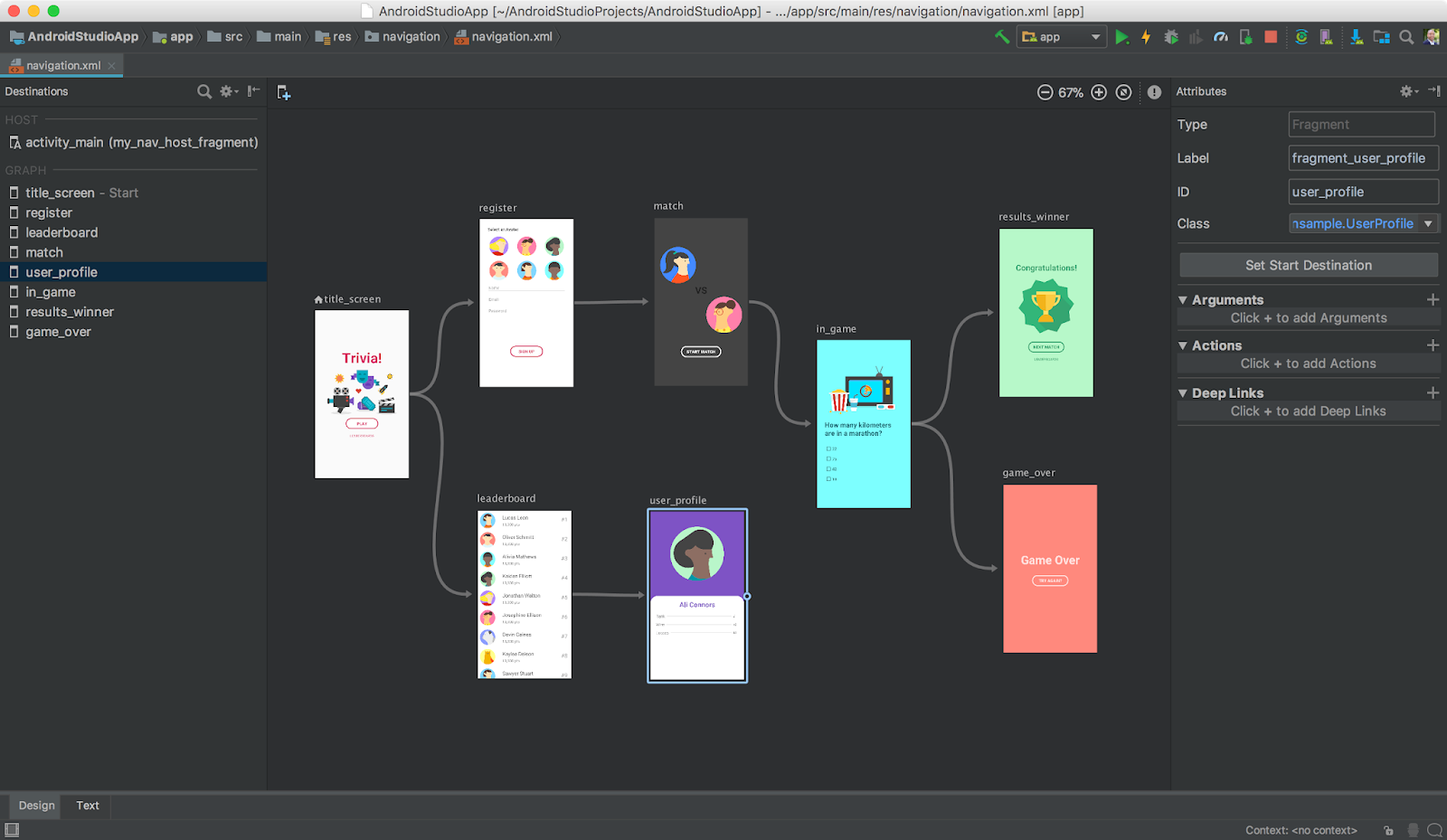
Navigation graph에서는 Navigation editor를 사용하거나 xml을 직접 수정함으로써 앱에서 사용할 모든 화면과 그 연관관계, 이동방법등을 정의합니다. xml 파일은 res/navigation/ 폴더에 저장되어야 합니다.
¶ Navigation host
Navigation host는 Navigation graph에서 정의한 프래그먼트를 화면에 표시하기 위한 컨테이너입니다. 컨테이너를 배치할 레이아웃 파일에 FragmentContainerView를 추가해줍니다.
<androidx.fragment.app.FragmentContainerView
        android:id="@+id/nav_container"
        android:layout_width="match_parent"
        android:layout_height="match_parent"
        android:name="androidx.navigation.fragment.NavHostFragment"
        app:defaultNavHost="true"
        app:navGraph="@navigation/mobile_navigation"/>
android:name="androidx.navigation.fragment.NavHostFragment" 속성에 의해 View가 NavHostFragment에 연결됩니다. 그리고 app:defaultNavHost="true" 속성에 의해 Navigation host가 시스템의 Back 버튼 입력을 가로채 이전 화면으로 전환하게 합니다. 마지막으로 Navigation host가 다루어야 할 Navigation graph를 app:navGraph으로 지정해줍니다.
¶ Navigation controller
Navigation controller는 화면의 전환을 수행하는 컨트롤러입니다. 모든 Navigation host는 하나의 Navigation controller를 가집니다. 프래그먼트를 전환하기 위해서는 Navigation host로부터 Navigation controller의 인스턴스를 얻어 navigate 메소드를 실행하면 됩니다.
이 때 Navigation controller의 인스턴스를 프래그먼트 안에서 얻기 위해서는 findNavController를 사용하고, 액티비티 안이라면 NavHostFragment의 navController를 사용합니다.
// Fragment
val navController = findNavController()

// Activity
val navHostFragment = supportFragmentManager.findFragmentById(R.id.nav_host_fragment) as NavHostFragment
val navController = navHostFragment.navController
¶ Safe Args를 사용하여 프래그먼트간 데이터 전달하기
기존에는 프래그먼트 사이에서 간단한 데이터를 전달하는 데에는 Key-Value 타입의 Bundle을 사용했습니다. 하지만 Bundle은 타입 안정성을 보장하지 않는 한계가 있습니다. 그래서 내비게이션 컴포넌트에서는 Safe Args 개념을 도입해서 다음과 같은 타입의 데이터를 안전하게 전달할 수 있도록 했습니다.
| Type | app:argType syntax | Support for default values | Handled by routes | Nullable |
|---|---|---|---|---|
| Integer | app:argType="integer" | Yes | Yes | No |
| Float | app:argType="float" | Yes | Yes | No |
| Long | app:argType="long" | Yes - Default values must always end with an 'L' suffix (e.g. "123L"). | Yes | No |
| Boolean | app:argType="boolean" | Yes - "true" or "false" | Yes | No |
| String | app:argType="string" | Yes | Yes | Yes |
| Resource Reference | app:argType="reference" | Yes - Default values must be in the form of "@resourceType/resourceName" (e.g. "@style/myCustomStyle") or "0" | Yes | No |
| Custom Parcelable | app:argType="", where is the fully-qualified class name of the Parcelable | Supports a default value of "@null". Does not support other default values. | No | Yes |
| Custom Serializable | app:argType="", where is the fully-qualified class name of the Serializable | Supports a default value of "@null". Does not support other default values. | No | Yes |
| Custom Enum | app:argType="", where is the fully-qualified name of the enum | Yes - Default values must match the unqualified name (e.g. "SUCCESS" to match MyEnum.SUCCESS). | No | No |
Safe Args가 활성화되면 세 종류의 클래스가 자동으로 만들어지게 됩니다.
- 내비게이션의
action이 시작되는 대상의 이름에Directions라는 접미어가 붙은 클래스 - argument를 전달하는데 사용한
action의 이름과 동일한 이름의 클래스 - 데이터를 수신하는 대상의 이름에
Args라는 접미어가 붙은 클래스
이 클래스들을 사용해 다음과 같은 방식으로 인수를 설정하고 navigate 메서드에 전달함으로써 프래그먼트 사이에 데이터를 전달할 수 있게 됩니다.
override fun onClick(v: View) {
   val amountTv: EditText = view!!.findViewById(R.id.editTextAmount)
   val amount = amountTv.text.toString().toInt()
   val action = SpecifyAmountFragmentDirections.confirmationAction(amount)
   v.findNavController().navigate(action)
}
이렇게 해서 Jetpack Navigation에 대해 알아보았습니다.